Your receipts, safe in a haven that never phones home.
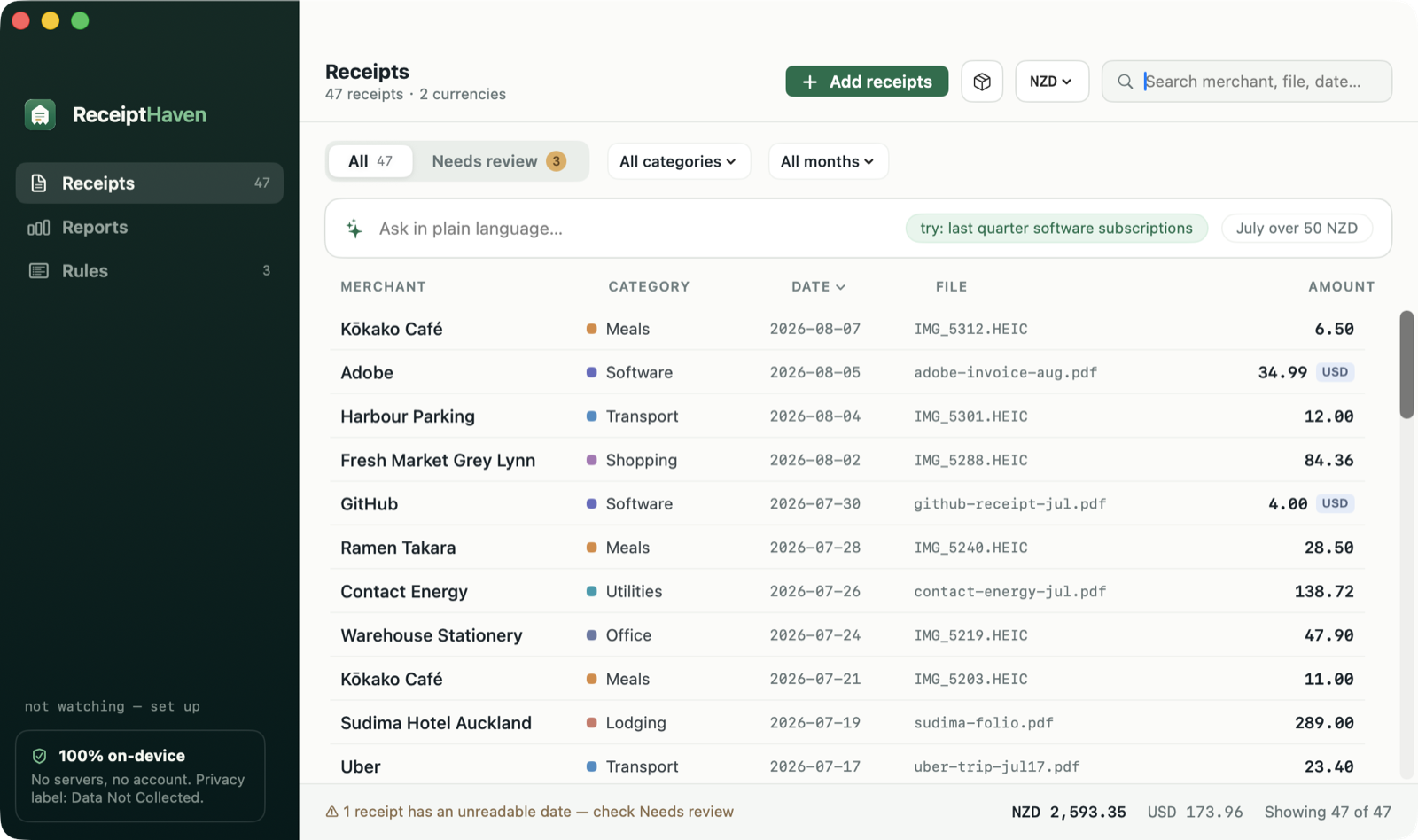
Drop receipts in. ReceiptHaven reads them with on-device Apple Intelligence, files them, and builds your tax-ready reports. No cloud. No account. No subscription.
Want the day-one link? Leave your email — that's the only thing we'll ever send.
Free to download · 14-day free trial, no card · Then one payment of $38.99 — never a subscription
How it works
Three steps between a messy Downloads folder and a report your accountant will actually thank you for.
Drop them in
Drag in PDFs, photos, or screenshots — or point ReceiptHaven at a folder and every new receipt is processed automatically.
AI reads them — locally
Merchant, amount, currency, date, category. Extracted by the model built into your Mac's chip. Nothing is uploaded, ever.
Reports, done
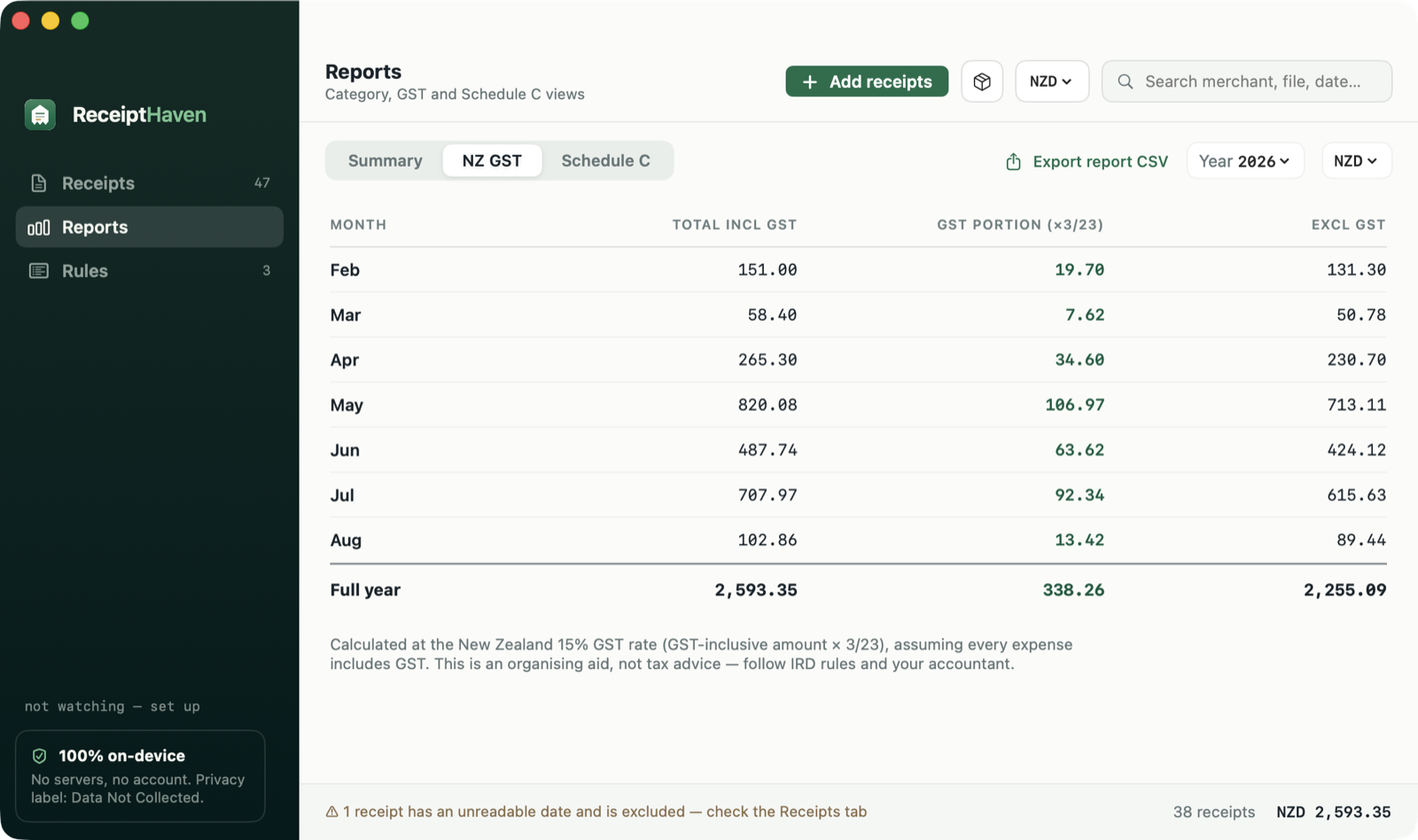
Category × month summaries, NZ GST and US Schedule C views, CSV export, and a zip bundle with every original file for your accountant.
Built for how receipts actually behave
Crumpled thermal paper, branch-name chaos, "$" that could be four currencies — the messy parts are the product.
Watched folders
New receipt lands in the folder, processed in seconds. Set it once, forget it.
Rules that learn
Fix "MOJO WYNYARD" to "Mojo" once — every branch, every misread, every future receipt follows your correction.
Ask in plain language
"Last quarter software subscriptions." "July over $50." Natural-language search, resolved on-device.
Tax-ready views
NZ GST (×3/23) by month and year. US Schedule C line mapping. Multi-currency kept honest — never silently mixed.
Accountant bundle
One click: detail CSV + every original file, renamed consistently, zipped and ready to send.
Review queue
Low-confidence extractions are flagged for a quick human check. Duplicates are caught by content, not filename.
Reports your accountant will actually thank you for
NZ GST worked out month by month, a colour-coded category heat map for the whole year, and US Schedule C line mapping — export any of it, or zip it up with every original file in one click.
Your financial documents are yours.
ReceiptHaven has no servers, no analytics, no account system — because the AI runs on your Mac's own chip via Apple's Foundation Models framework. That's also why it can cost $38.99 once instead of $30 a month: there is no cloud bill to pass on to you.
- All OCR and AI analysis happens on your Mac
- Works with Wi-Fi off — try it
- Your data lives in one local folder; delete the app, and it's gone
- App Store privacy label: Data Not Collected
The math is not subtle
Cloud receipt services charge every month to store your financial documents on their servers. ReceiptHaven charges once to keep them off servers entirely.
| ReceiptHaven | Receipts Space | Shoeboxed | Expensify | |
|---|---|---|---|---|
| Price | $38.99 once | $59.99 / year | $348+ / year | $60+ / year |
| Files stay on your device | ✓ | ✓ | ✗ cloud | ✗ cloud |
| On-device AI extraction | ✓ | ✗ | ✗ | ✗ |
| Natural-language search | ✓ | ✗ | ✗ | ✗ |
| NZ GST / Schedule C views | ✓ | partial | ✗ | ✗ |
| Accountant zip bundle | ✓ | ✗ | ✓ | ✓ |
Comparison as of August 2026, from public pricing pages. Different tools, different strengths — pick what fits.
Simple, honest pricing
Free to download. Free to use for 14 days. Then one payment — never a subscription.
- Free on the Mac App Store — every feature, 14 days
- No card and no account to start the trial
- One payment unlocks every Mac on your Apple Account
- All features. No tiers, no seats, no upsells
- If the trial ends first, your receipts stay browsable and exportable
- Requires Apple Silicon Mac with Apple Intelligence
Not out yet — leave your email and we'll send the link the day it lands.
Questions, answered
Where exactly is my data?
In a single folder on your Mac (~/Library, inside the app's container). ReceiptHaven makes no network connections for your documents — the AI model ships with macOS itself. Turn off Wi-Fi and everything still works.
What do I need to run it?
An Apple Silicon Mac (M1 or later) running macOS 26 or newer with Apple Intelligence enabled. That's what powers the on-device model.
Which receipts does it understand?
PDFs (both digital and scanned), photos, and screenshots — in English and Chinese, including mixed-language receipts, GST invoices, ride-share trip summaries, and app-store bills. Anything it's unsure about is flagged for a quick review instead of silently guessed.
Can I add receipts from my iPhone?
Yes — press the iPhone button in ReceiptHaven and your iPhone opens its document scanner. Snap the paper receipt and it lands on your Mac and gets filed, in one motion. The scan travels device-to-device, never through a server. AirDrop and watched iCloud Drive folders work too.
Is there a free trial?
Yes — download free from the Mac App Store and everything is unlocked for 14 days. No card, no account, no sign-up; the trial never phones home either. If it ends before you've decided, your receipts stay browsable, searchable and exportable — we don't hold your data hostage, only adding new receipts is paused.
Is this a subscription in disguise?
No. It's one in-app purchase, charged once, and it never expires — on every Mac signed in to your Apple Account. There's nothing to renew and nothing to cancel. If a future major version is big enough to charge for, it'll be its own separate purchase and this one keeps working exactly as it does today.
How do refunds work?
App Store purchases are refunded by Apple, not by us — reportaproblem.apple.com, and they're generally generous within 14 days. That's also why we'd rather you use the 14-day trial first: no money changes hands until you already know it works for your receipts.
One-time purchase — how is that sustainable with AI?
Because the AI runs on your Mac, our marginal cost per user is zero. Subscriptions in this category mostly pay for other people's cloud bills. We don't have one.
Is this tax advice?
No. ReceiptHaven organizes and summarizes; the GST and Schedule C views are classification aids, not advice. Your accountant (or IRD/IRS) has the final word.